
Simply Draw: Learn to Draw
Simply LtdEducation
4.74.58K Reviews
- Version
- 1.21.0
- Installs
- 10.00M
- Age Rating
- Everyone
Screenshots
Our Review of Simply Draw: Learn to Draw
 Analysis by Appyee
I like drawing apps most when they help me get past the blank-page pause instead of making me feel that I need to know art terms first. Simply Draw: Learn to Draw is aimed at that starting point: it gives you a guided way to practise, one manageable mark at a time. I find that approach especially useful when I have a few spare minutes and want to make something rather than scroll through inspiration without picking up a pencil.
A practical first session
My most useful way to approach a guided drawing lesson is to treat it as practice, not a test. I follow the example at a comfortable pace, keep my strokes loose, and resist the urge to erase every line that looks imperfect. That makes the lesson feel less intimidating and helps me notice the shape or technique being taught instead of judging the finished result too early.
A small habit makes these sessions more valuable: after following a lesson, I try the same subject once more without looking at the guide. The second attempt shows which parts I understood and which ones I only copied. It also turns a short exercise into a simple learning loop, without needing special equipment or a large block of free time.
This is where Simply Draw: Learn to Draw can fit naturally into an everyday routine. I could use it during a quiet break, at a kitchen table while waiting for dinner, or as a low-pressure activity with a child. The practical benefit is not that every sketch becomes impressive; it is that a clear next step makes it easier to begin again tomorrow.
Choose a setup that helps you focus
Before settling into a lesson, I would check the app’s available settings and make the display comfortable to work with. A screen that is too dim or a device placed flat and far away can make following visual guidance more tiring. If I am drawing on paper while looking at the phone, I keep the screen close enough to see the demonstration without repeatedly breaking my concentration.
I also decide in advance whether I want to draw directly on a device or use the app as a visual guide while sketching on paper. Those are different experiences: drawing on a screen is convenient for quick corrections, while paper gives a more familiar feel and makes it easier to keep a physical record of attempts. I would not assume one method is automatically better; the useful choice is the one that makes me practise more often.
For a shared family session, I would give each person their own sheet of paper and let everyone work at a different pace. It avoids turning a lesson into a race to finish first, and younger learners can focus on the shapes that interest them. Because the app is rated for everyone, it is suitable for a broad audience, although an adult may still want to help a young child with device use and keep the activity relaxed.
Repeatable habits beat rushed progress
When a lesson has several steps, I find it helpful to pause at natural points and compare the developing sketch with the reference. Rather than correcting everything at once, I look for one useful adjustment: perhaps the proportions, the angle of a line, or the spacing between shapes. This keeps practice deliberate and prevents a common beginner trap—adding detail before the basic structure feels right.
Another good pattern is to revisit a subject after a little time has passed. The first session can be about following instructions; a later attempt can focus on drawing the same idea with less reliance on them. That comparison gives me a more honest sense of progress than judging a single picture by whether it looks polished. It is also a good way to spot which fundamentals deserve another round of attention.
As an education app from Simply Ltd, it is best understood as a guided practice companion rather than a substitute for every kind of art learning. Its central appeal is making drawing feel approachable. If I want a structured prompt to get started, that is useful; if I want detailed critique on my own work, a human teacher or a class with individual feedback may serve me better.
Where guided lessons help—and where they stop
Step-by-step teaching can reduce the uncertainty of a blank page, but it can also make a learner too dependent on examples. I would use a lesson to understand how a drawing is built, then change one element—such as the expression, pose, or setting—rather than repeatedly tracing the same result. That small variation helps turn imitation into observation and gives practice a more personal purpose.
There is a trade-off between convenience and depth. A mobile lesson is easy to pick up in short bursts, while a book, longer course, or in-person class may be better for sustained study, broader theory, or feedback on technique. If I were already comfortable with fundamentals and wanted demanding studies of anatomy, perspective, or composition, I would look for instruction focused specifically on those goals instead of expecting a beginner-friendly guide to cover everything.
I would also keep expectations sensible about progress. A guided exercise can show a method, but it cannot make every person’s hand control, patience, or available practice time identical. If a result feels awkward, that does not mean the lesson failed. I would repeat the difficult part, simplify the subject, or take a break rather than pushing through frustration and deciding that drawing is not for me.
Who is likely to enjoy it
I would recommend this style of app to someone who wants a clear prompt, has little drawing experience, or is returning to sketching after a long break. It also suits parents or teachers looking for a simple creative activity to try together, provided they treat the lesson as an invitation rather than a measure of talent. The free download makes it easy to explore the experience before deciding whether paid content is worth considering.
On the other hand, people who mainly want an open-ended digital painting studio may prefer an art tool built around blank canvases and extensive control. Someone who already follows structured lessons elsewhere may not need another guided starting point. And if personal critique is the main reason for seeking instruction, a community or teacher that responds directly to an individual drawing is likely to be more useful than practising alone.
What to know before spending time or money
The app is free to download, with in-app purchases listed from $14.99 to $89.99 per item. I would first use the available experience to decide whether the lesson format suits my habits, then review any purchase details carefully before buying. That matters most if I am unsure whether I prefer guided exercises or would rather spend my time with paper, a book, or another kind of art course.
It has an average rating of 4.8 from around 16,000 ratings, and it has been installed over 500,000 times. Those figures suggest that many people have found it worth trying, but they cannot tell me whether its teaching style matches my needs. The app is free and rated for everyone, and its current version is 1.4.2; it requires iOS 11 or later.
For anyone wondering whether they need drawing experience, I would say no: the guided format is most appealing precisely when you want help deciding what to do next. If you are asking whether it can replace a full art course, I would not treat it that way. It can make regular practice easier to start, while deeper study and personalized feedback remain separate needs.
My clearest advice is to try a short session, then repeat one exercise without following every step. If that leaves you curious to practise more, the app is doing something useful for you. If you find yourself wanting more freedom, tougher instruction, or detailed critique straight away, that is a good sign to choose a different learning route rather than forcing this one to fit.
Getting Started with Simply Draw
First things first, downloading the app is a breeze. Available on both Android and iOS, Simply Draw is designed for anyone who’s ever held a pencil and thought, "What now?" Upon opening the app, you’re greeted with a clean, intuitive interface that’s all about making art approachable.
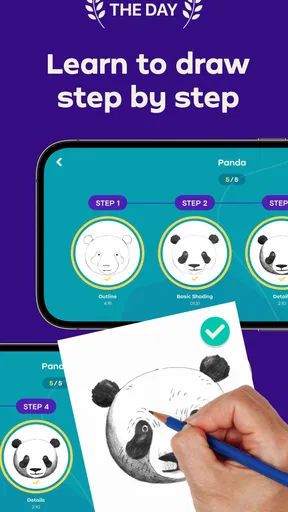
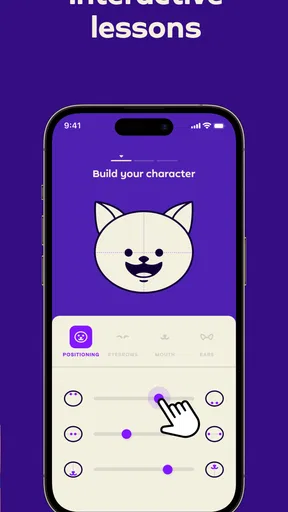
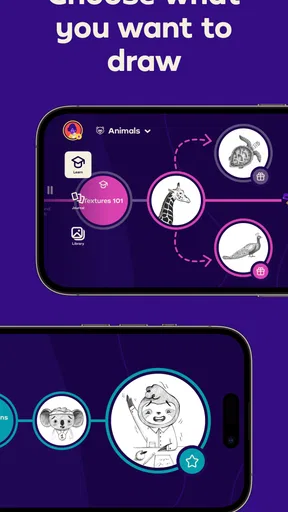
The app kicks things off with a quick tutorial that’s perfect for beginners. It breaks down the basics of drawing into simple steps, so you won’t feel overwhelmed. As someone who’s always been a bit hesitant about my art skills, I found this really comforting. The app offers a variety of lessons, each focusing on different aspects of drawing, from shading techniques to perspective drawing.
Features That Stand Out
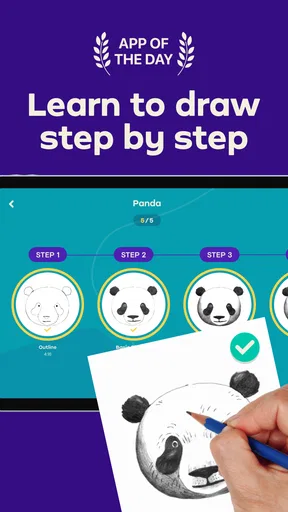
One of the coolest features is the step-by-step drawing guides. These guides are like having a professional artist sitting next to you, coaching you through each stroke. Whether you're sketching a landscape or a portrait, the guides are thorough without being complicated. I found myself actually looking forward to each new lesson!
The app also includes a wide range of drawing tools. You get to play with different pencils, brushes, and even colors. The digital canvas is responsive and smooth, making it feel like you’re drawing on real paper. And for those moments when my lines were less Picasso and more preschool, the undo button was a lifesaver!
Another feature that deserves a shoutout is the community section. You can share your artworks and get feedback from other users. It’s a vibrant community where you can learn, get inspired, and even participate in drawing challenges. It’s like social media, but for art nerds!
Why You’ll Love It
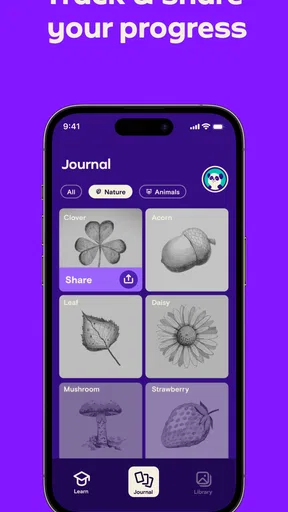
If you’re someone who loves progress tracking, Simply Draw has got you covered. The app allows you to save your work and track your improvement over time. It’s super motivating to see how much you’ve grown as an artist, even over just a few weeks.
The app is also great for all ages. Whether you’re a kid doodling during class or an adult looking to pick up a new hobby, Simply Draw caters to all skill levels. It’s family-friendly and educational, making it a great tool for parents and teachers alike.
Room for Improvement?
Now, no app is perfect, right? While Simply Draw is fantastic, I did notice a couple of areas where it could improve. For instance, some of the advanced tutorials could benefit from additional detail. As I progressed, I found myself craving more complex lessons, and I hope the developers will expand the library of tutorials in future updates.
Also, while the app does a good job of teaching techniques, it would be awesome to see more content on creative thinking and how to develop a personal style. But hey, that’s just my two cents!
Final Thoughts
All in all, Simply Draw is a fantastic app for anyone looking to dive into the world of drawing. It’s user-friendly, packed with features, and genuinely inspiring. Whether you’re a newbie or a seasoned sketcher, this app has something to offer. Plus, it’s a fun way to unwind and express yourself.
So, if you're ready to dust off those creative cobwebs and give drawing a whirl, I highly recommend giving Simply Draw a try. Grab your device, download the app, and let your artistic journey begin!
Privacy and Permissions
See what permissions an app requests and how it handles your data.
- Photos/Media/Files
- read the contents of your USB storage, modify or delete the contents of your USB storage
- Storage
- read the contents of your USB storage, modify or delete the contents of your USB storage
- Camera
- take pictures and videos
- Microphone
- record audio
- Other
- view network connections, full network access, run at startup, prevent device from sleeping, Google Play license check
Verdict
Strengths of Simply Draw: Learn to Draw
- User-friendly interface for beginners.
- Wide variety of drawing tutorials.
- Offline access to lessons.
- Regular updates with new content.
- Supports multiple drawing tools.
Limitations of Simply Draw: Learn to Draw
- Limited advanced techniques.
- Ads can be intrusive at times.
- In-app purchases for extra content.
- No social sharing options.
- Requires initial internet setup.
Other Releases by Simply Ltd
View All
Simply Piano: Learn Piano Fast
Education4.6

Simply Sing: My Singing App
Music & Audio4.5

Simply Guitar - Learn Guitar
Education4.6

Guitar Tuner - Simply Tune
Music & Audio4.8
Similar Picks in This Category
View All
Duolingo: Language Lessons
Duolingo4.7

Google Classroom
Google LLC2.8

Unacademy: Learn & Crack Exams
Unacademy3.2

Bible App for Kids
Life.Church4.4

Cake - Learn English & Korean
Cake Corp.4.7

Brainly: AI Homework Helper
Brainly4.5
Frequently Asked Questions
What is Simply Draw: Learn to Draw, and who is it for?
Simply Draw: Learn to Draw is a user-friendly app designed for anyone interested in learning how to draw, from beginners to advanced artists. It offers step-by-step tutorials, a variety of drawing tools, and a diverse range of subjects to choose from. Whether you're a hobbyist or a budding artist, this app provides a comprehensive platform to enhance your skills.
What features does Simply Draw offer to enhance learning?
Simply Draw includes a variety of features such as layered tutorials, interactive exercises, and a wide array of brushes and colors. The app also offers a tracing feature to help users understand proportions and lines better. Additionally, users can access video tutorials and save their progress, making it an excellent tool for consistent skill development.
Is Simply Draw suitable for children, and does it have parental controls?
Yes, Simply Draw is suitable for children and includes parental controls to ensure a safe learning environment. The app is designed with an intuitive interface that is easy for children to navigate. Parents can monitor and restrict access to certain features or content, providing a secure and educational experience for younger users.
Does Simply Draw require an internet connection to use its features?
Simply Draw can be used offline for most of its basic drawing features and tutorials. However, for accessing video tutorials, community features, and downloading additional content, an internet connection is required. This flexibility allows users to practice drawing anytime, anywhere, without being entirely dependent on internet access.
Are there any in-app purchases or subscriptions in Simply Draw?
Simply Draw offers a free version with basic features and tutorials. However, it also includes in-app purchases and subscription options for advanced tutorials, exclusive content, and additional drawing tools. Users can choose to upgrade for a more enriched learning experience, but the free version still provides substantial value for beginners.
